

 ChatGPT
 Claude
 Gemini
 Perplexity AI
You open Webflow's pricing page ready to make a quick decision, and twenty minutes later you have nine tabs open and no answer. Is it $15 or $39? Why are there two different lists of plans?
Do you pay per site, per person, or both? And what exactly is a "Workspace" versus a "Site plan"? For a tool that markets itself on clarity, the pricing has historically been the single most confusing part of choosing Webflow.
The good news: Webflow simplified everything in its May 2026 pricing update, collapsing the old CMS and Business tiers into one cheaper Premium plan. The bad news: most articles still explain the old structure.
This post breaks down current Webflow pricing the way we'd explain it to a client on a call, plainly, with the two-bill model that makes the whole thing click, and a simple method to land on the right plan in five minutes.
Why Getting Webflow Pricing Right Matters for B2B Teams
Picking the wrong plan costs you in two directions. Under-buy, say, choosing Basic to save $10, and you discover mid-launch that you can't publish a blog, forcing a rushed upgrade and a migration of content you already built.
Over-buy, and you're paying for Growth Workspace seats and enterprise bandwidth you'll never touch.
The stakes are higher than the monthly number suggests, because your website is rarely a solo purchase. The moment two marketers, a designer, and a founder all need access, the per-seat side of Webflow pricing becomes the real cost driver, and it's the part the headline price hides.
Teams that budget off the $25 Premium number and then get a $120 invoice feel misled, when they simply weren't shown the full model.
Getting it right isn't about finding the cheapest plan. It's about matching the plan to how your team actually works, how many people touch the site, whether you publish content, and whether you'll need code export or client billing down the line.
The Two Bills: Site Plans vs Workspace Plans
This is the single concept that unlocks Webflow pricing. Webflow charges for two different things, and you almost always pay for both:
- Site plans cover hosting one published website, the domain, the CMS, the bandwidth, the SSL. One Site plan per live site.
- Workspace plans cover the environment where people design and build, seats, staging sites, code export, and collaboration.
Think of it as renting the storefront (Site plan) and paying the staff who work in it (Workspace plan). A freelancer building one simple site might pay only a Site plan on a free Workspace.
A ten-person marketing team pays a Site plan plus several Workspace seats. Once you hold these two apart, the pricing page stops fighting you.
Webflow Site Plans in 2026 (Hosting Your Website)
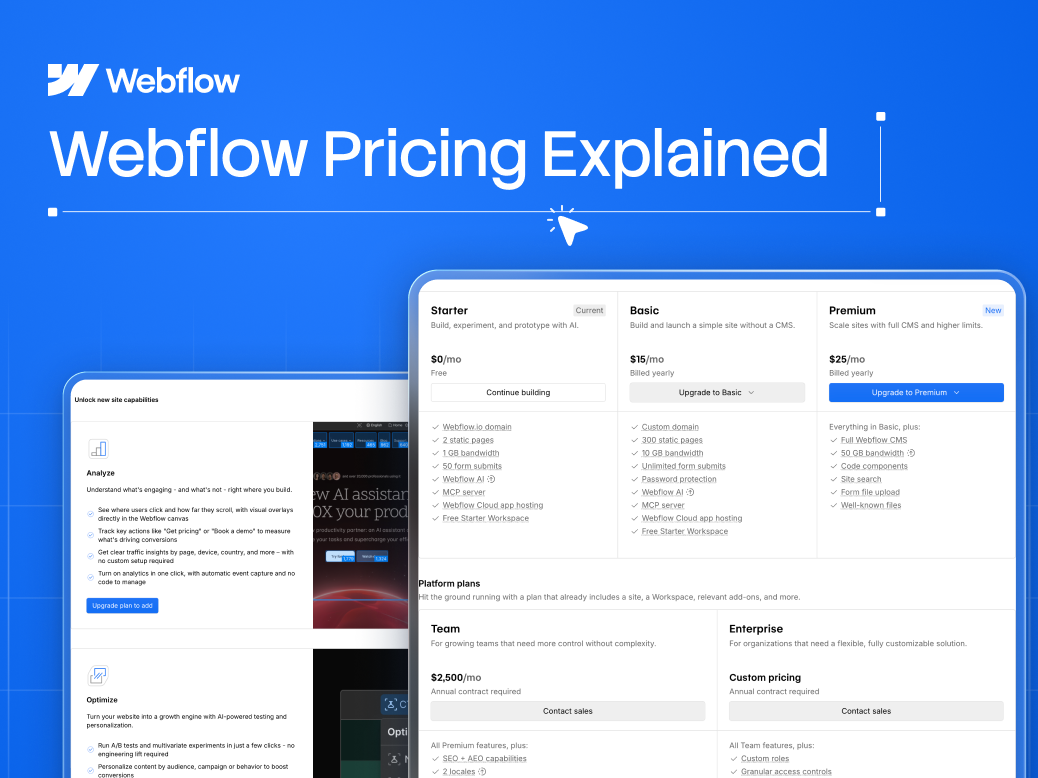
After the May 2026 simplification, there are three publicly priced Site plans plus Enterprise. Prices below are billed annually (monthly billing runs higher):
| Site Plan | Price (annual) | CMS Items | Best For |
|---|---|---|---|
| **Starter** | Free | Very limited | Testing, prototypes on a webflow.io subdomain |
| **Basic** | ~$15/mo | None (static) | Simple marketing sites with no blog or CMS |
| **Premium** | ~$25/mo | 20,000 items, 40 Collections | B2B sites with a blog, resources, or any dynamic content |
| **Enterprise** | Custom | Custom | Security, SLAs, advanced scale |
The headline change: Premium replaced the legacy CMS ($23) and Business ($39) plans, bundling 20,000 CMS items and 40 Collections into one lower-priced tier with 50GB base bandwidth (extendable via add-ons) and Webflow Cloud capabilities.
For content-driven B2B sites, this is a straightforward price cut over the old structure.
The decision here is binary for most teams: if you need a blog, case studies, or any repeatable content, you need Premium.
Basic is static-only, beautiful for a five-page brochure site, a dead end the day you want to publish an article. Given how central content is to B2B SEO in 2026, most SaaS sites should default to Premium.
Webflow Workspace Plans in 2026 (Your Team's Seats)
Workspace plans govern who can build and how. For in-house teams there are three tiers, Starter (free), Core, and Growth, but the more useful lens in 2026 is the per-seat model, because that's what actually shows up on the invoice:
- Full Seat (~$39/mo), a builder who can design, edit, and publish. Your designers and site owners.
- Limited Seat (~$15/mo), a content editor or contributor working in the Editor/CMS, not the full designer.
- Free Seat ($0), reviewers and commenters who need to see and give feedback but never build.
The free Starter Workspace includes one full seat and two staging sites but blocks code export, fine for a solo builder, limiting for a team. Core (~$19/mo) unlocks code export and more staging; Growth (~$49/mo) adds higher limits for scaling teams. Enterprise is custom.
The practical takeaway: your Workspace cost scales with people, not sites. A single marketer needs one full seat. A team where three people build and two write and one approves adds up fast, and that's by design.
Webflow Add-Ons in 2026 (Where the Cost Really Hides)
Beyond the two bills sits a third layer most budgets forget: usage-priced add-ons that stack on top of your Site plan. They're optional, but for a serious B2B site one or two become essential, and one of them can cost more than everything else combined. Here's each, with 2026 pricing:
| Add-On | What It Does | Starting Price |
|---|---|---|
| **Bandwidth** | Extra data transfer beyond your plan's base allowance | ~$20/mo per 50GB (up to 2.5TB) |
| **Analyze** | Cookieless, privacy-first site analytics in your dashboard | ~$9/mo (2,000 sessions) |
| **Optimize** | Native A/B testing, multivariate, AI personalization | from ~$299/mo (by page views) |
| **Localization** | Multi-language site with translated, SEO-friendly content | ~$9/mo per locale (Essential) |
| **AI credits** | Powers Webflow's AI assistant and build features | included pool; +2,000 for ~$20/mo |
Bandwidth. Every Site plan ships with a base allowance (50GB on Premium). Exceed it for two consecutive months and Webflow either auto-upgrades you or bills roughly $20/month per additional 50GB, up to 2.5TB.
Most B2B sites never trigger this, but image-heavy pages, a large resource library, or a viral moment can. Compress your assets and it stays a non-issue.
Analyze. Webflow's own cookieless, privacy-friendly analytics, built into the dashboard, no GA4 setup, no cookie-banner friction. It starts around $9/month for 2,000 sessions and scales with traffic.
This is a convenience buy: if you already run GA4 (free) plus Microsoft Clarity, you likely don't need it. If you want privacy-first numbers without wiring up third-party tools, it's cheap insurance.
Optimize. The big one. Optimize is Webflow's native A/B testing, multivariate testing, and AI-driven personalization suite, the CRO layer built directly into the site. It starts around $299/month and scales by monthly page views (25K, 50K, 100K, 250K, 500K tiers).
That's a genuine line item, so only switch it on when you have the traffic and the testing discipline to use it. Below meaningful volume, a cheaper standalone testing tool does the same job, we cover the options in our guide to the best CRO tools for SaaS.
Localization. For selling into multiple regions, Localization turns one Webflow site into a properly translated, SEO-friendly multi-language experience, the right way to do it, versus bolting a translation widget onto the front end.
Essential runs about $9/month per locale (up to 3 locales, machine translation, basic SEO localization); Advanced is about $29/month per locale (up to 10 locales, plus asset localization so you can swap images or video by region). You pay per language, so a three-language site is roughly 3× the per-locale price.
AI credits. Webflow's AI features run on a monthly credit pool included with every Workspace plan, around 200 credits on Starter, 300 on Core, 400 on Growth.
Light users never hit the ceiling. If you lean on AI heavily, an extra 2,000 credits runs about $20/month billed annually. For most teams it's a rounding error, not a decision driver.
The pattern across all five: they're priced by usage, so your bill grows with your traffic and ambition. That's fair, but it's also exactly why the sticker price misleads. Budget for the add-ons you'll actually turn on, and treat Optimize as its own decision, not an afterthought.
The Windmark Webflow TCO Check
Clients ask us "which Webflow plan should I get?" and the honest answer is always "add up your total cost of ownership, not the plan you clicked first." The Windmark Webflow TCO Check is three questions that get you to the real monthly number:
- Do you publish content? Yes → Premium Site plan. No → Basic. (This is your hosting line.)
- How many people build vs. edit vs. review? Count Full Seats, Limited Seats, and Free Seats. (This is your Workspace line, usually the biggest surprise.)
- What add-ons will you actually use? Bandwidth, Analyze, Optimize, Localization, or AI credits, see the table above. Skip what you won't touch, and treat Optimize (~$299/mo+) as a separate decision since it can dwarf your base plan. (This is your variable line.)
Sum the three. For a lean B2B marketing team, Premium site, one full seat, one limited editor seat, a couple of free reviewers, you land around $113–$128/month on annual billing. That's the number to budget, and it's a different planet from the $25 sticker. Do this math before you buy, not after the invoice.
Which Webflow Plan Is Right for You?
- Solo founder, simple site, no blog: Basic Site plan on a free Starter Workspace. Roughly $15/mo.
- B2B SaaS site with a blog: Premium Site plan + one Full Seat. The standard modern setup; budget ~$45–65/mo.
- Growing marketing team (multiple editors + approvers): Premium + a mix of Full, Limited, and Free seats. Expect ~$113–$128/mo.
- Agency or freelancer building for clients: Use Webflow's Workspace and client-billing structure so clients own their Site plan while you retain build access, the model we use at Windmark to hand off sites cleanly.
- Enterprise: Custom pricing for SSO, security reviews, SLAs, and scale. Talk to Webflow directly.
For most companies reading this, the answer is Premium Site plan plus the seats you genuinely need, nothing more.
Confirm the exact current numbers on Webflow's official pricing page before you commit, since Webflow adjusts pricing periodically. See Windmark's Webflow development service and our B2B website build case study.
Choosing With Confidence
Webflow pricing looks complicated only until you separate the two bills, hosting your site and paying your team, and run the TCO check.
Do that, and you'll pick a plan in five minutes instead of losing an afternoon to browser tabs. For the vast majority of B2B teams in 2026, the answer is a Premium Site plan and the handful of seats you actually need.
If you're weighing Webflow for a new site or a redesign and want a second opinion on the plan and a build that's engineered to convert, not just to launch. That's what we do. If you're a B2B SaaS team planning your website this quarter, Windmark's Webflow development service is built for exactly that.